> For the complete documentation index, see [llms.txt](https://quteng-1.gitbook.io/quteng-docs/llms.txt). Markdown versions of documentation pages are available by appending `.md` to page URLs; this page is available as [Markdown](https://quteng-1.gitbook.io/quteng-docs/shi-gong-cha-yan-yu-que-shi-zhui-zong/app/er-zhi-xing-xian-chang-cha-yan-yu-tu-mian-biao-ji.md).
# 二、 執行現場查驗與圖面標記
建立單據後,即可對照現場實際狀況,逐一完成各項檢驗標準的評估。
1. **記錄檢查結果**: 在檢查工項單中,會依據**檢查時機**列出所有應檢項目。判定「**檢查結果**」(**通過V / 未通過X**)。點擊單一項目展開底部彈窗,輸入「**檢查數值**」,並點擊相機圖示上傳現場照片。
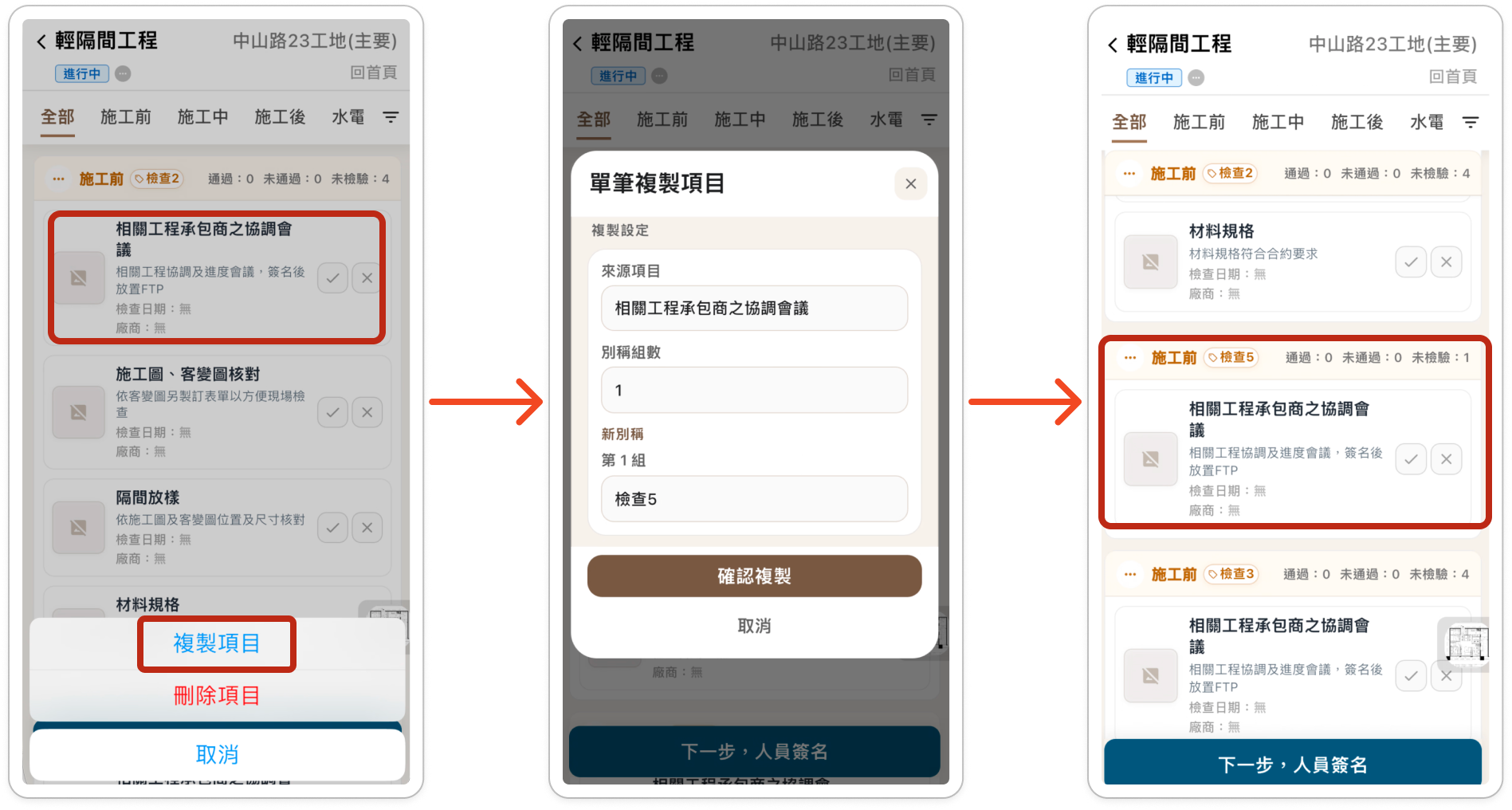
2. **複製檢查項目**:若同樣的檢查項目需要多個人員檢查或是需要分別紀錄,可以使用這個功能。若以檢查時機整批複製,點擊檢查時機左側**功能按鈕**(...圖示),單筆複製則長按該項目,選擇底部彈窗的「**複製項目**」並輸入別稱即完成複製。
單筆複製
批次複製
3. **圖面標記(定位)**: 為了精確記錄缺失或施工位置,在展開的項目彈窗右上角,點擊「**地標**」圖示。系統會開啟該樓層的平面圖,您只需在圖面上點擊,即可快速建立標註點,讓後續修繕人員一目了然。
---
# Agent Instructions
This documentation is published with GitBook. GitBook is the documentation platform designed so that both humans and AI agents can read, navigate, and reason over technical content effectively. Learn more at gitbook.com.
## Querying This Documentation
If you need additional information that is not directly available in this page, you can query the documentation dynamically by asking a question.
Perform an HTTP GET request on the following URL with the `ask` and `goal` query parameters:
```
GET https://quteng-1.gitbook.io/quteng-docs/shi-gong-cha-yan-yu-que-shi-zhui-zong/app/er-zhi-xing-xian-chang-cha-yan-yu-tu-mian-biao-ji.md?ask=&goal=
```
`ask` is the immediate question: it should be specific, self-contained, and written in natural language.
`goal` is what the user is ultimately trying to achieve, the reason they need the answer. Sharing it helps GitBook give you a better, more relevant answer. A goal is most helpful when it describes the outcome the user wants rather than restating the question. For example, with `ask=how do I create an API token`, a goal like `build a script that syncs our docs to a CMS` lets GitBook tailor the answer to that use case.
The response will contain a direct answer to the question and relevant excerpts and sources from the documentation.
Use this mechanism when the answer is not explicitly present in the current page, you need clarification or additional context, or you want to retrieve related documentation sections.